---
title: Shopify Theme Development
description: A theme controls the user interface and feel of the online store. It makes the storefunctional and interactive with the customers. Store Theme Limitations A store can have only 20...
keywords:
  - Shopify
  - Theme
  - Development
canonical_url: "/shopify-theme-development/"
date_published: "2021-01-13"
date_modified: "2026-04-30"
type: post
author: Contrive Solutions
---

# Shopify Theme Development

<p>A theme controls the user interface and feel of the online store. It makes the store<br />functional and interactive with the customers.</p>   

 <h3>Store Theme Limitations</h3>   

 <p>A store can have only 20 themes installed, and only one of them<br />can be published which customers will see when the store is live.</p><h3 style="color: #f4a840;"><b>Store Theme Limitations: </b></h3><p>A store can have only 20 themes installed, and only one of them<br />can be published which customers will see when the store is live.</p>   

 <h2>Shopify Theme Kit</h2>   

 <p>Shopify provides an online editor to write code and update the store theme in store<br />admin dashboard. But that’s not the best approach and developers need to set up a<br />local environment for theme development.</p><p>Theme Kit is a cross-platform command line tool for building shopify themes.</p><h3 style="color: #f4a840;"><b> Benefits: </b></h3>  

Upload themes to multiple environments, fast uploads and downloads and  

watch for local changes and upload to shopify automatically.  

<br><br>  

Creating theme configuration file,theme configure   

 <h2>Local Theme Development Setup</h2>   

 <p>Setting up local environment in 3 magic steps,  

<ul>  

 <li>Install ThemeKit </li>  

<li>Setting up API credentials</li>  

<li>Push your theme</li>  

</ul>  

</p>   

 <h2>Theme Kit Installation</h2>   

 Installation on linux,  

<br>  

<code style="background:#F4A840; color:#FFFF">  

curl ​ -s​ https://shopify.github.io/themekit/scripts/install.py | ​ sudo ​ python  

</code>   

 <h2>Theme Permissions: Creating private app to setup API key</h2>   

 To access the shopify store data in theme we have to create a private app that will  

generate API key and password and have to give read and write permission to themes.  

Start developing shopify theme from scratch,  

<br>  

<br>  

<code style="background:#F4A840; color:#FFFF">theme new ​ --password​ =[​ your-password] ​ --store​ =[​ your-store.myshopify.com] ​ --name​ =[​ theme  

name] </code>  

<br><br>  

To start developing on existing theme we have to setup the config file as follows,  

<p style="margin-left: 1.5rem; margin-top: 2rem; padding-top: 1rem;"><b>Development:</b></p>  

<p style="margin-left: 1.5rem;"><b>password: </b> ​ <code style="background:#F4A840; color:#FFFF">shppa_a1b2c3d4e5f6g7h8i9j10klmno1112 </code></p>  

<p style="margin-left: 1.5rem;"><b>theme_id: ​ </b> <code style="background:#F4A840; color:#FFFF"> 1234567890 </code></p>  

<p style="margin-left: 1.5rem;"><b>store: ​</b> <code style="background:#F4A840; color:#FFFF">storename.myshopify.com</code></p>  


 <h2>Common Commands</h2>   

 <p>  

<code style="background-color:#f4a840; color:#FFFF;">theme watch</code> ​ watch the current directory changes and update the remote theme on  

shopify  

</p>  

<p>Deploying theme to shopify,   

<code style="background-color:#f4a840; color:#FFFF;">theme deploy  

</code>  

</p>  

<p>Publishing theme ,  

<code style="background-color:#f4a840; color:#FFFF;"> theme publish   

</code>  

</p>   

 <h2>Theme Directory Structure</h2>   

 <p>  

A theme is defined by Shopify as a set of files organized in a certain folder structure. At  

the highest level we find the following directories:  

</p>  

<ul>  

<li>assests</li>  

<li>config</li>  

<li>layout</li>  

<li>locales </li>  

<li>sections</li>  

<li>snippets</li>  

<li>Templates</li>  

</u>  

 <h2>JavaScript and CSS</h2>   

 <p>The assets folder will have all the JS and Scss/Css files. These will be included in the  

<b>theme.liquid </b>under layout directory.</p>   

 <h2>Theme Sections</h2>   

 <p>Sections are modular, customizable elements of a page, which can have specific  

functions. Sections can be statically included in a theme's templates (like the header  

and footer), or they can be dynamically added to the theme's homepage from the  

Theme Editor.  

</p>  

<p>  

Including sections in liquid templates, ​ <code style="background: #f4a840; color: #ffff;">{% section 'header' %} </code>  

</p>   

 <h2>Shopify’s Templating Language</h2>   

 <p>  

Shopify’s template language makes it possible to static code and also dynamically  

populate the page with data from a Shopify store. The static elements are written in  

HTML, and the dynamic elements are written in Liquid.  

</p>   

 <h2>Liquid: 3 main features</h2>   

 <p>Following are the three main features of the liquid</p><ul><li>objects</li><li>tags</li><li>filters</li></ul>   

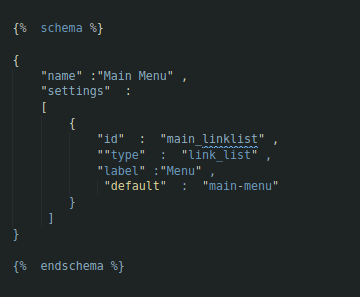
 <h2>Generating Schema</h2>   

 Schema tags contain JSON which would determine how the theme editor reads our  

content.  
 <img width="360" height="297" src="/wp-content/uploads/2021/01/shopifyCode.png" alt="shopifyCode" decoding="async" loading="lazy" srcset="/wp-content/uploads/2021/01/shopifyCode.png 360w, /wp-content/uploads/2021/01/shopifyCode-300x248.png 300w" sizes="auto, (max-width: 360px) 100vw, 360px" />   

 <h3>Quick Links</h3>   

 <ul>  

 <li>  

 <a href="/">   

 Home  

 </a>  

 </li>  

 <li>  

 <a href="/about-us/">   

 About us  

 </a>  

 </li>  

 <li>  

 <a href="/services/">   

 Services  

 </a>  

 </li>  

 <li>  

 <a href="/insights/">   

 Blogs  

 </a>  

 </li>  

 <li>  

 <a href="/portfolio/">   

 Portfolio  

 </a>  

 </li>  

 <li>  

 <a href="/contact-us/">   

 Contact US  

 </a>  

 </li>  

 <li>  

 <a href="/career/">   

 Career  

 </a>  

 </li>  

 </ul>  

 <h3>Contact Us</h3>   

 <ul>  

 <li>  

 <a href="tel:+924235199410" style="color:inherit !important;">   

 042 35199410  

 </a>  

 </li>  

 <li>  

 <a href="tel:+923274945650" style="color:inherit !important;">   

 +92 327 4945650  

 </a>  

 </li>  

 <li>  

 <a href="mailto:connect@contrivesolution.com" style="color:inherit !important;">   

 connect@contrivesolution.com  

 </a>  

 </li>  

 </ul>  

 <h3>Address</h3>   

 <ul>  

 <li>  

 50-C, Commercial Zone Block E PIA Society, Lahore, Punjab  

 </li>  

 <li>  

 Danville, CA  

 </li>  

 </ul>  

 <h3>Follow Us</h3>   

 <a href="https://www.facebook.com/contrivesolutions/" target="_blank">  

 Facebook-f  

 </a>  

 <a href="https://twitter.com/contrivesol?lang=en" target="_blank">  

 Twitter  

 </a>  

 <a href="https://www.linkedin.com/company/contrive-solutions/?originalSubdomain=pk" target="_blank">  

 Linkedin  

 </a>  

 <a href="https://instagram.com/contrive.solutions" target="_blank">  

 Instagram  

 </a>  

 <h3>What Market Says About Us!</h3>   

 <a href="https://pk.indeed.com/cmp/Contrive-Solutions-77f3e079/reviews">  

 <img src="/wp-content/uploads/elementor/thumbs/indeed-300x86-1-rp6lv2i8jth76jiz9itw1lst1h0g9ff4cc8ynz8xz8.png" title="Indeed job reviews" alt="Indeed job reviews - Contrive Solutions rated employer" /> </a>  

 <a href="https://www.google.com/search?q=contrive+solutions&oq=contrive+Solutions&aqs=chrome.0.69i59j46i175i199j35i39j0j0i22i30j69i61j69i60l2.8031j1j4&sourceid=chrome&ie=UTF-8#lrd=0x39190109ee94ce0b:0xa4f77fb08417cb05,1,,,">  

 <img src="/wp-content/uploads/elementor/thumbs/GoogleReview-1-300x147-1-rp6lv2i6lnfp8yr09rlglttfx43q6v1mkclnnvmcl8.png" title="GoogleReview-1-300×147" alt="GoogleReview-1-300x147" /> </a>  

 <a href="https://clutch.co/profile/contrive-solutions">  

 <img src="/wp-content/uploads/2021/07/clutchReview.png" title="Clutch verified reviews – Contrive Solutions" alt="Clutch verified reviews - Top AI development company" /> </a>  

 <a href="https://www.goodfirms.co/company/contrive-solutions">  

 <img src="/wp-content/uploads/2021/07/goodfirms.png" title="GoodFirms certified – Contrive Solutions" alt="GoodFirms certified - Leading software development agency" /> </a>  

 <a href="https://www.secp.gov.pk/">  

 <img src="/wp-content/uploads/2025/02/secp-logo.png" title="secp-logo" alt="secp-logo" /> </a>  

 <a href="https://www.pasha.org.pk/">  

 <img src="/wp-content/uploads/2025/02/pasha-logo-white.png" title="P@SHA member – Contrive Solutions" alt="P@SHA member - Pakistan Software Houses Association" /> </a>